Since June 2026, Strava subscribers have been able to connect their account to Claude, the AI assistant made by Anthropic. Once connected, you can ask about your own training in plain English. Ask whether your easy runs are easy enough, and Claude reads your actual runs to answer rather than guessing.
That makes it a useful tool for something many runners find hard: a training plan built around their own running, not someone else’s template. This article covers what the connection does, how to set it up, how to get a sensible plan from it, and where its limits are.
It is aimed at members who already record their runs on Strava. You need no technical knowledge, but the Strava side does need a paid subscription. Costs are covered near the end.
What the connection actually does
The connection has two halves. Strava supplies the data through a connector it built and runs; Claude does the reading, reasoning and writing. The connector is read-only, so Claude can look at your activities but cannot upload, edit or delete them.
Once you approve it, Claude can read your full activity history and the detail behind each run: second-by-second heart rate and pace, GPS routes, and your club and event data (Strava press release). It reads live data, so a run uploaded this morning is visible straight away. An exported file, by contrast, is a one-off snapshot.
Strava says the connector currently covers activity history, fitness trends, readiness, goal planning, cross-training and gear, with more to come (Strava Help Center). It also makes some subscriber-only analytics available outside the Strava app for the first time.
Strava adds two caveats. Claude works things out its own way, so its figures can differ from the app’s, including Performance Predictions. There is also a cap on how many requests you can make per minute and per day.
Setting it up
Setup takes a few minutes and is done once. You need a paid Strava subscription and a Claude account; Claude’s connectors are open to all users, including the free plan (Claude Help Center).
- Check you are eligible. The connector comes with a paid Strava subscription, including the Strava and Runna bundle, Family and Student plans. A free trial does not count until it converts to paid.
- Sign in to Claude at claude.ai, or create an account. The website or desktop app is easiest for setup; adding connectors on the phone app is still in beta.
- Find Strava. Open the sidebar, choose Customize, then Connectors. Click + and search for Strava.
- Approve access. Click Connect and Strava’s own sign-in page opens. Read what it asks for, then approve.
- Start a chat. Claude brings Strava in when a question needs it. If it does not, click + in the message box, open Connectors and check Strava is switched on.
Once connected on the web, Strava also works in the Claude phone app. If Strava does not appear in the list, check Settings > MCP on strava.com, or You > Settings > AI Assistants in the Strava app (Strava Help Center).
What makes the plan bespoke
A plan is only as good as its starting point. An off-the-shelf plan has to guess yours; Claude can check it in Strava, then fill the gaps with what you tell it.
What Claude can work out from Strava
-
- How much you run now: weekly distance and number of runs over recent months.
-
- Your longest recent run, and how often you have gone that far.
-
- Typical paces for easy runs, parkruns and races, plus heart rate if you wear a sensor.
-
- Training load and fitness trends from Strava’s subscriber analytics.
-
- How consistent you have been, including gaps for illness, injury or holidays.
-
- Other sport you log, such as cycling, swimming or gym sessions.
What only you can tell it
-
- The goal: the race, its date, and whether you want to finish comfortably or chase a time.
-
- Which days you can run, and how long you have on each.
-
- Club sessions you want to keep; the club calendar shows what runs when.
-
- Injury history, current niggles, and anything a physio has told you.
-
- Life around running: shift work, family, travel, a holiday in week six.
The second list matters as much as the first. Strava records what you did, not why. Claude cannot tell that a slow run was a recovery jog with a friend, or that your calf has been tight for a month.
Asking for a plan
The most useful habit is to ask Claude to read your training back to you before it plans anything. If its summary looks wrong, you catch the problem before it is built into twelve weeks of sessions.
A starting prompt you can copy and fill in:
Look at my Strava running over the last three months. First, summarise what you see: weekly distance, longest runs, typical easy pace, and any gaps. Then ask me anything you need before building a plan.
I want a [12]-week plan for a [half marathon] on [date]. My aim is to [finish comfortably / run about 1:55]. I can run [four] days a week: [days]. Keep the club session on [day] and my long run on [day]. I had [injury] last year, so build up gently and include easier weeks.
Once you have a first draft, shape it with follow-ups. These work well:
-
- “Show the plan as a table, one row per week, with total distance and the long run.”
-
- “Why does week 4 drop in distance?”
-
- “I am away for weeks 7 and 8 and can only run three times. Adjust around that.”
-
- “Based on my heart rate data, what pace should my easy runs be?”
-
- “Put everything in miles.”
Asking why is worth doing. A good plan has reasons behind each week, and hearing them helps you judge whether to trust it. Keep check-ins in the same conversation so Claude has the plan to hand; in a new chat, paste the plan in first.
A worked example: Sam’s half marathon
Sam is a fictional member who runs three times a week and has never followed a plan. The goal is a spring half marathon 12 weeks away, so Sam starts with the prompt above. Claude’s summary might read like this:
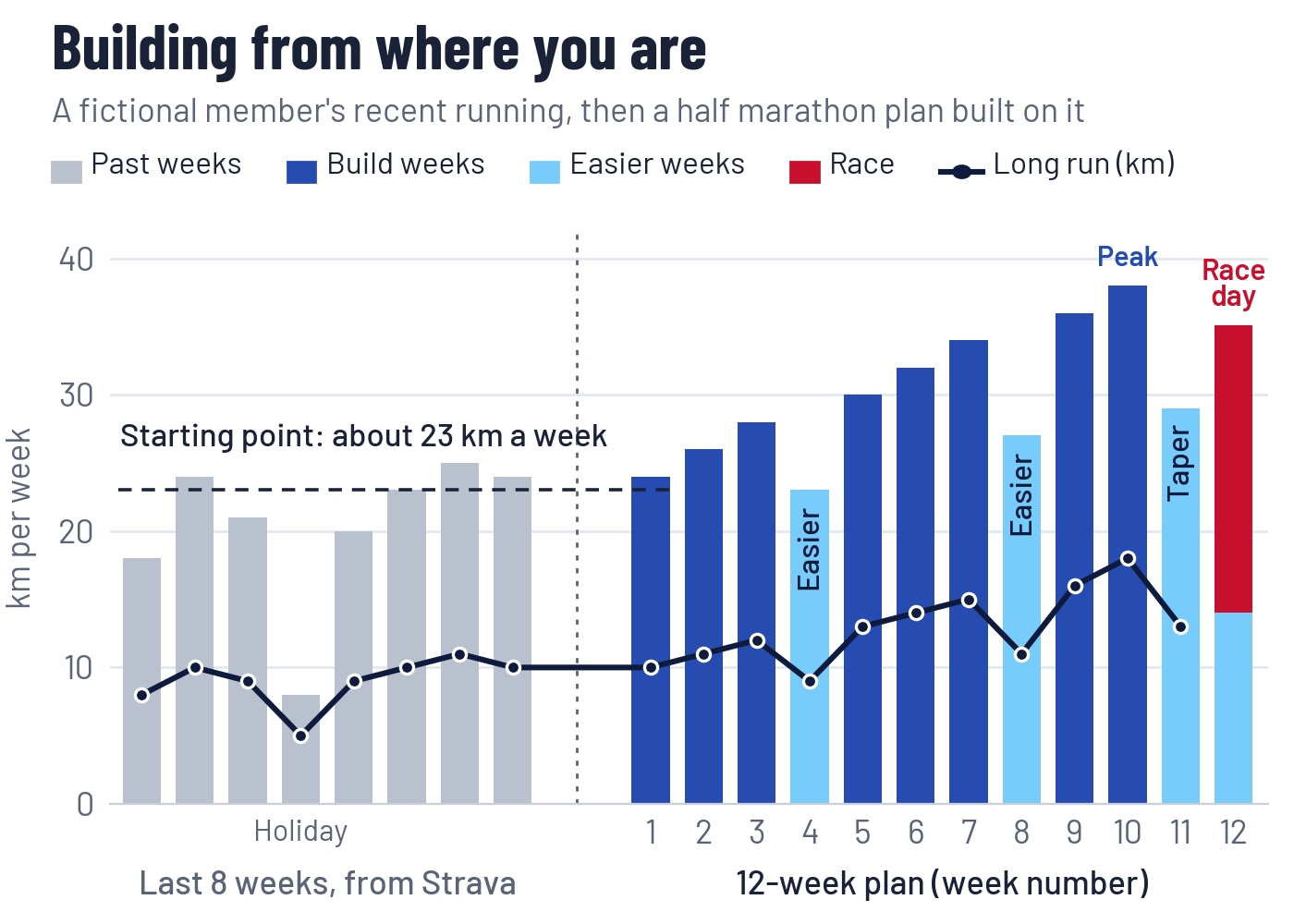
Over the last eight weeks you have averaged about 23 km a week across three runs. Your longest run is 11 km, and one week was almost empty, probably a holiday. Your easy runs average 5:50 per km, close to your parkrun pace, so they may not be easy enough.
Sam then fills the gaps: four running days are possible, the Tuesday club session stays, and Sunday suits the long run. A sore Achilles last winter means building gently.
The plan starts from Sam’s real running, not a textbook figure. Weekly distance climbs gradually, with an easier week every fourth week and a lighter final fortnight.
Distance peaks at 38 km in week 10, about two-thirds more than Sam runs now. The long run reaches 18 km two weeks before race day: long enough to trust the distance, early enough to arrive fresh.
Most weeks keep one harder session, the club night, and make the rest easy. Week 6 looks like this:
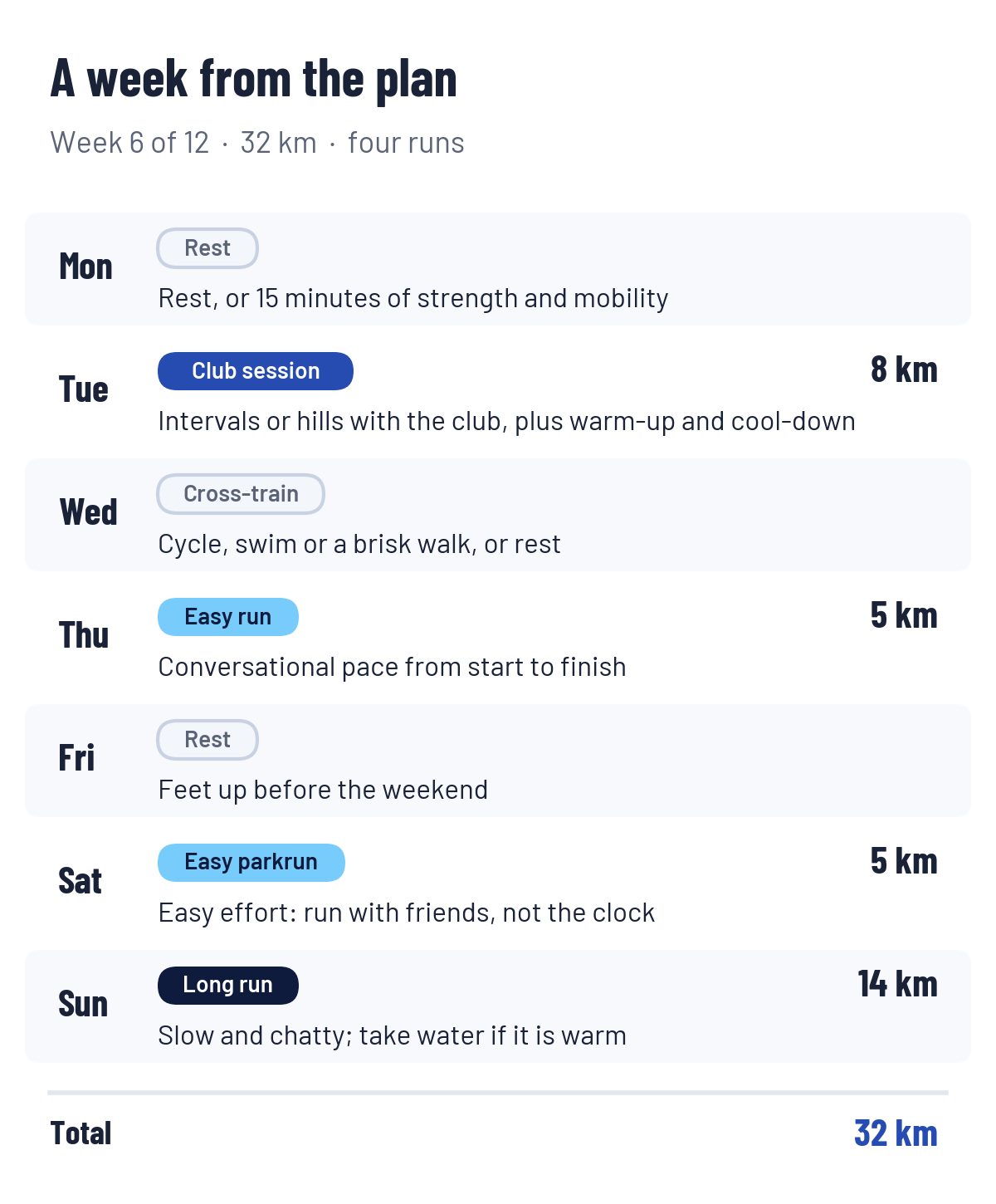
Three details show the plan was built for Sam rather than copied from a book:
-
- Easy runs are set by conversation, not pace, to tackle the too-fast habit Claude spotted.
-
- Saturday’s parkrun is run easy, so Sunday’s long run starts on fresh legs.
-
- If the Achilles grumbles at a check-in, Claude can bring an easier week forward.
Keeping the plan on track
The weekly check-in is where a live connection earns its keep. Claude compares what you actually ran with what the plan said, then suggests changes to the weeks ahead.
A Sunday evening check-in might look like this:
Compare this week’s runs on Strava with week 5 of the plan. How did it go, and does next week need changing? My left calf felt tight after Thursday’s session.
A few principles are worth holding Claude to:
-
- Missed runs are gone. Do not squeeze them into the following week; pick the plan up where it is.
-
- Ease back in after illness. After a cold, ask for a few easy days before harder sessions return. After a temperature or chest infection, rest until you have recovered.
-
- Effort counts, not just pace. If an easy run felt hard, say so. It can be the first sign that a lighter week is needed.
-
- Rebuild rather than patch. If several weeks go off course, ask Claude to rebuild the rest of the plan around a realistic target.
Getting the plan out of the chat
A plan you cannot see on a Tuesday morning is easy to ignore. Claude can reshape the same plan into whatever format suits you:
-
- Calendar: ask for a calendar file (.ics) and import it into Google Calendar, Outlook or your phone. Each session lands on its day.
-
- Spreadsheet: a week-by-week table to open in Excel or Google Sheets and tick off as you go.
-
- One-page summary: the whole plan on a single sheet to print and pin up.
The Strava connection is read-only, so it cannot push sessions to Strava or to your watch. Interval sessions still need setting up on the watch by hand, or following from the plan on your phone.
Limits and sensible use
Claude is a capable planner, not a coach, physio or doctor. It cannot watch you run, see how you move, or notice that you look tired. It can also get things wrong, so treat its plan as a well-reasoned first draft.
Whatever the plan, check it has these basics:
-
- Weekly distance rises gradually, with an easier week every three or four weeks. The “10% rule” is a rough guide, not a law.
-
- Most running is easy, at a pace where you could hold a conversation.
-
- Long runs build from what you already do, not from an ideal starting point.
-
- Distance drops in the final one to two weeks before a race, so you arrive fresh.
Data can mislead, too. GPS drift under trees, treadmill runs, a watch left running in the car, or a wrist heart-rate sensor on a cold morning can all skew what Claude sees. If a number looks odd, ask which runs it used.
Stop and get proper advice if you have sharp or localised pain, swelling, pain that worsens as you run, or pain that changes your stride. Chest pain, unusual breathlessness or dizziness need medical help straight away. If you are new to running or coming back from injury, talk to a physio or qualified coach before following any plan.
Privacy: what you are sharing
Connecting Strava gives Claude a detailed record of your running, including heart rate and GPS traces. Connectors see your data as your own account does (Claude Help Center), so assume that includes routes starting from your home.
Three things are worth checking:
-
- Strava’s permission screen. It appears when you click Connect. Access is read-only and limited to your own account (Strava Help Center).
-
- Claude’s model training setting. On Free, Pro and Max plans, you choose whether your chats help train future models. If it is on, chats can be kept for up to five years; you can switch it off at any time in Claude’s Privacy Settings (Anthropic).
-
- What you type. Anything you tell Claude about injuries or health becomes part of the chat. Share what the plan needs, and no more.
To disconnect, open Strava on the web, go to Settings > My Apps and click Revoke Access next to Claude. This works whichever app you connected from. You can also disconnect from the Connectors page in Claude.
What it costs, and the alternatives
The Strava subscription is the essential cost. In the UK it has been around £55 a year or £9 a month (BikeRadar); check the app for your current price.
On the Claude side, the free plan includes connectors, memory and file creation, which covers everything in this article (Claude pricing). Long planning chats can hit the free usage limit, though. Claude Pro is listed at US$20 a month before tax, less if paid annually, and gives at least five times the usage per session.
Claude is one option among several, and they suit different runners:
| Option | Best at | Watch out for | Cost |
|---|---|---|---|
| Claude + Strava | Reading your full history, explaining its reasoning, rebuilding plans around real life | Cannot send sessions to your watch; needs sense-checking | Strava subscription; Claude’s free plan works |
| Runna (owned by Strava) | Structured plans that adapt as you train and sync to your watch | A separate subscription unless bundled | Its own subscription, or the Strava + Runna bundle |
| Garmin Coach | Adaptive plans built into Garmin Connect | Only for compatible Garmin watches | Free with the watch |
| Club sessions and coaching | People who can see you run, plus group motivation | Set times and places | Part of membership |
The options combine well. Many runners will get the most from a Claude plan built around club nights.
Where the club fits in
A plan from Claude works best alongside the club, not instead of it. Build it around the club sessions you enjoy, and let club runs supply the easy miles every plan needs. And don’t forget our coaches are always on hand to provide advice on training plans too.
Sources
-
- Strava launches MCP connector, Strava press release, 1 June 2026
-
- What is the Strava MCP Connector?, Strava Help Center
-
- Use connectors to extend Claude’s capabilities, Claude Help Center
-
- Updates to Consumer Terms and Privacy Policy, Anthropic
-
- Plans and pricing, Claude
-
- Strava subscription price rise, BikeRadar